Testing the MacBook Pro PROLED XDR: buy it not for the touchscreen, but for everything else
At a starting price of €3,299 (14‑inch) or €3,899 (16‑inch), the new MacBook Pro PROLED XDR is, at launch, the most expensive MacBook ever in Apple’s history. It also becomes the first MacBook with a touchscreen, 16…
Receive a summary of important news every evening with Le Récap’
Every 4-5 years, Apple reviews the design of its famous MacBook Pros. Its operating method is always the same: the brand updates the high-end models in year 1, then extends the new design to other Macs the following year. We remember in particular the Unibody redesign of 2008 (the first chassis cut from a single block of aluminum with a large trackpad and a screen), the Retina redesign of 2012 (with the abandonment of the disk drive and an ultra high definition screen), the Touch Bar model in 2016 (with the touch bar and the controversial all-USB-C bet) then the renewal of 2021, post-Apple Silicon, with the return of ports, the arrival of a screen Mini-LED and 120 Hz. Each time, the redesign first concerned the large versions or high-end chips… before being extended to “entry-level” MacBook Pros.
2026 is the year of a new cycle for the MacBook Pro. Only eight months after revisions M5 Pro and M5 Max, which remain in the catalog, Apple launched on November 6 the MacBook Pro PROLED This new generation is expensive (from 3,299 euros for 14 inches, from 3,899 euros for 16 inches), but it seems obvious that the general public will be able to benefit from the new design at a lower price in the coming years. What is the MacBook Pro PROLED XDR worth and who is this first generation intended for? Here is our honest opinion after a few days of testing.
It would be unfair to say that the touch screen of the new MacBook Pro is useless: this is not true. But it would also be wrong to claim that this is a major revolution for Apple computers: its current implementation, which Apple fully supports, does not make it the novelty that some commentators would have you believe.
During our first days with the MacBook Pro, we found ourselves using touch to interact with web pages, particularly to select buttons or zoom in on the screen. But this habit has still not become natural: in 99% of cases, we use the trackpad and keyboard. In fact, during our first hour of testing the device, we realized at one point that we had forgotten that the PROLED XDR screen was touchscreen. We did all the setup and our performance testing with the trackpad without even thinking about touching the screen.
How can we explain this negligence, which would amount to forgetting that you can fold an iPhone Duo? It's simple: nothing in macOS is there to encourage using the touch screen. Even the configuration of the operating system does not highlight this aspect, we would not be surprised if a part of the computer's customers, particularly among professionals, never discover that their screen can react to the finger. And it's ultimately rather good news: Apple is not making the mistake of relying on an interface that doesn't convince it. Touch is an option, period.
Method: reports are grouped by the words of their headline and summary; each newsroom counts once; figures are read from the reports as published. Nothing here is written by an AI.
Apple being Apple, the brand has still made some adjustments. Among them:
But in other aspects, touch is not ready. Apps that allow you to “swipe” with two fingers on the trackpad do not always allow touch swiping, in the same way that certain apps that require a click then a movement do not understand when you try to grab things with your finger. There are also a lot of false clicks: we sometimes touch the screen next to a target, because the interface is smaller than on iPadOS. Developers will obviously be able to update their apps, but what's the point? Even Apple indicates that touch is not the priority on macOS.
Why offer touchscreen without changing everything? Apple assumes its choice and wants to be pragmatic: its position 16 years ago on the complexity of using a touch screen vertically has not changed. But the supplier of the best Tandem OLED screens on the market, a priori Samsung Display, only manufactures panels with integrated touchscreen. The brand then had two choices: deactivate the touchscreen… or accept it. And since some of the users, especially the youngest, have only known touch screens since they were little, then it is time to stop resisting on principle. The Mac becomes tactile, but is not a device designed to be tactile. And that’s very good.
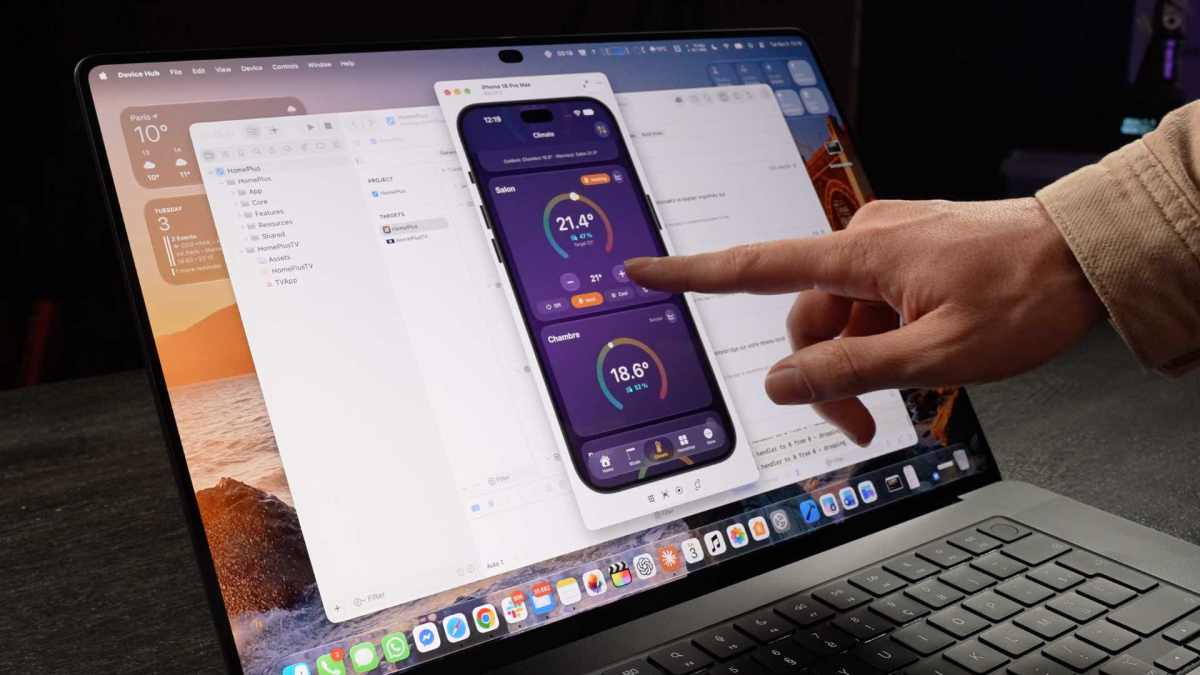
For the purposes of our test, we vibe-coded with Claude an application that uses all of Apple's APIs for touch. We noted that the screen recognized up to 10 fingers, that it was very responsive and that it technically allowed us to play or compose music, although it was not as good as on an iPad or an iPhone. The only use that seems obvious to us is the use of an iPhone remotely via iPhone Mirroring (still blocked in the EU) or the iPhone/iPad simulator in Xcode, for developers. The time saving is monstrous compared to using the trackpad. Otherwise, touchscreen is for the moment only the end of a historical resistance, not a historical novelty.
The touchscreen also brings two small flaws. The first is fingerprints: the panel retains the slightest mark, which is obvious as soon as you display a dark background or the screen turns off. You need to get into the habit of cleaning your Mac like you clean your smartphone. The second is the screen which moves a little with each touch. Apple redesigned the hinge to limit this bounce and the result remains reasonable, but we are far from the stability of an iPad placed on a table. It’s an accepted compromise. Fortunately, the screen still opens with one finger (contrary to what some influencers claim).
Apple has also anticipated the problem even in video calls: when you touch the screen during a video, the front camera automatically stabilizes the image so that the interlocutor does not see the frame shaking. Attention to detail, in the absence of an essential use. And for those who are annoyed by touch, it can be deactivated in the Accessibility settings.
Apple is taking advantage of the move to touchscreen OLED to add another iPhone feature to Macs: Dynamic Island. Appearing for the first time with the iPhone 14 Pro, this island around the front camera intelligently exploits the nature of the OLED pixels (which are autonomous) to display information on a false black notch. It's unsurprisingly much prettier than the horrible, thick notch of previous generations of MacBooks, all with even thinner screen borders. The only regret: full-screen apps continue to display a large black band instead of being cut out at the camera.
For now, Dynamic Island is still very limited on macOS. Apple houses several system functions such as volume and brightness control (why never did this on iOS?), Spotlight and Siri for search with a very nice animation (you can detach the window and reattach it afterwards, it's very beautiful) or media content controls, which finally make it easy to pause a tab that is too noisy. But there's not much happening in Dynamic Island for the moment: we'll have to wait for the developers to exploit it (which they can't yet do when the machine comes out). Apple told us that iOS apps with live activity support would automatically be compatible, but our testing suggests that's not the case. It will take a little work from the developers to get everything to display normally.
A quick word on the shiny apple Another novelty that catches the eye: the return of the shiny apple on the back of the Mac, in a hybrid form between the pre-2015 implementation (a white apple that lights up with the screen backlight panel) and the post-2015 black apple.
This time, the apple is black... but a dedicated panel behind allows it to be lit in white. The effect is great and makes it easier for owners of a MacBook Pro PROLED XDR to get noticed, which obviously suits Apple's business. It will be possible to deactivate it in a future macOS update so as not to disturb your neighbors in the dark.
The Tandem OLED screen is the real crazy thing about the new MacBook Pro. For the first time, Apple is putting an OLED screen in a Mac. After the Apple Watch (2015), the iPhone X (2017), the iPad Pro (2024) and the new iPad mini, the Mac was the last major family of Apple products still faithful to LCD. It still is for the most part: the MacBook Air, the iMac and the other MacBook Pros remain LCD. The classic MacBook Pro M6, M5 Pro and M5 Max use Mini LED, an LCD panel whose backlight is divided into several zones which light up independently.
With OLED, there is no backlight at all: each pixel produces its own light and can turn off completely. The contrast increases to 10,000,000:1, the blacks are true blacks and the halos around light elements on a dark background disappear. These halos were the main fault of the Mini LED, very visible with white subtitles on a film or a cursor on a terminal in dark mode. As on the iPad Pro, Apple uses a “Tandem” panel which stacks two layers of pixels to gain brightness, energy efficiency and lifespan.
Apple goes further than most laptop OLED screens and quite simply claims the best laptop screen on the market. On paper, the technical sheet has enough to justify it:
In use, the brightness is impressive and the panel remains readable even when looking at the screen from the side, where the Mini LED loses contrast.
From our point of view, this is where the real novelty of the MacBook Pro PROLED XDR lies. The screen alone justifies changing Macs, in a year where almost nothing else is moving, including the bottom of the chassis. One question remains unanswered: will the entry-level 14-inch MacBook Pro, currently sold for 2,299 euros with an M6 chip and a Mini LED screen, be entitled to the same screen next year? Or will Apple reserve a simpler OLED for it, without PROLED XDR technology and without touchscreen? The panel is so successful that it's hard to imagine it in a cheaper Mac. In any case, it makes us sad to have to return the machine to return to the Mini LED.
For once, we have not launched any benchmarks for this test. The reason is simple: the MacBook Pro PROLED XDR does not introduce any new chips. The M5 Pro and M5 Max are the same as the MacBook Pros released in the spring and their performance is already known. What you need to remember is that MacBook Pros are war machines, as comfortable in 8K editing as in compilation or local AI, thanks to their unified memory. We don't know of a competing laptop that offers so much power in such a thin chassis, especially since the MacBook Pro loses weight: 1.38 kg in 14 inches and 1.82 kg in 16 inches (- 15%).
The rest is at the level you'd expect from a Mac at this price: Wi-Fi 7 and Bluetooth 6 with the N1 chip, six speakers (four woofers and two tweeters), a very good keyboard and the best trackpad on the market. The connectivity does not change (three Thunderbolt 5 ports, HDMI, SDXC reader, MagSafe 3 and jack), and the autonomy is very good, except in high performance mode (for Xcode compilation for example), where the computer must be used on the mains. We can only blame Apple for the lack of 5G, even though the iPads are entitled to it.
A question arises: does an OLED screen, with a touch screen that is insignificant in use, justify paying 400 euros more than a 14-inch M5 Pro MacBook Pro in Mini LED (3,299 euros versus 2,899 euros)? It’s up to each user to respond. The developer who uses his MacBook Pro with the cover closed, connected to external screens, already knows that he would be better off saving money. It's up to Apple to generalize this design across the entire range.
The MacBook Pro PROLED
If OLED and touchscreen don't interest you, the Mini LED MacBook Pro M5 Pro remains in the catalog starting at 2,899 euros, and the 14-inch M6 MacBook Pro starts at 2,299 euros.
Numerama+ subscribers provide the resources necessary to produce quality information and allow Numerama to remain free.
Not everyone can afford to pay for information. That’s why we keep our journalism open to everyone.
But if you can, here are three good reasons to support our work:
If you believe in a free web and quality information accessible to as many people as possible, join Numerama+.